If you are running k8s workloads on a linux machine, chances are that you are using Gnome desktop environment as well. With growing number of pods, your mount list will be bigger and bigger. gvfs-udisks2-volume-monitor is Gnome tool that is monitoring volumes and devices, and occasionally can do stuff, like mounting usb drive for you. But in my case it was eating whole CPU.
https://bugs.launchpad.net/ubuntu/+source/gvfs/+bug/2047356
I know that
systemctl stop --user gvfs-udisks2-volume-monitorcan be use as a workaround, but I found better, permanent solution.
dnf group remove gnome-desktopOf course, before doing that, explore alternatives. For me, window manager of choice is i3wm. It is a highly customizable, lightweight tiling window manager.
Lets start with tiling. It means, that windows can not overlap each other, utilize maximum available space, and can be easly moved around using keyboard shortcuts.
Tiling window manager automatically arranges windows for you. It is handy when dealing with high resolution, ultra wide, or multi monitor setups. Windows can be rearranged, moved to different monitors or workspaces in fractions of seconds.
Tiling WMs are usually lightweight and have minimum dependencies. It makes them a goood choice for a server with occasional gui interaction. For example, by default, i3 can not display background image, and has no option to lock the screen. But those tools can be easly added to the config file.
The options for tiling WM are:
- i3. Minimalist window manager, with reasonably shallow learning curve, and easy to understand config file
- bspwm – organize windows in a form of binary tree(?). shell scripts allows complex behaviours(?)
- XMonad – written in Haskell, configuration require Haskell knowlege. Highly customizable, but steep learning curve
- AwesomeWM – Configured in LUA. Can work as floating WM, for specific usecases
- herbstluftwm – relatively smaller than previous, but still intresting project
- Qtile – written and configured in Python. Xmonad for Pythoninstas
- Sway – i3, but for Wayland
- dwm – maintained by suckless.org with all its assets an liabilities. Lets give them a voice: << Because dwm is customized through editing its source code, it’s pointless to make binary packages of it. This keeps its userbase small and elitist. No novices asking stupid questions. >>
Few years ago I chose i3. It is still a good choice, but today I would also consider Qtile. Anyway, there are two ways to get working i3.
- get a distro, that uses it as main WM, like https://fedoraproject.org/pl/spins/i3
- install it together with other WM. At login screen, you can choose what WM to use for that session
If you migrating from gnome, you can try this:
sudo dnf install i3 i3status dmenu i3lock feh allacrittyTools on that list are:
- i3 – just WM
- i3status – bottom bar for time, volume, battery, etc
- dmenu – starting apps
- i3lock – lockscreen
- feh – displaying background
- alacritty – blazing fast and lightweight terminal
That would be good for the start. Later on, you can replace i3status with https://github.com/greshake/i3status-rust – equivalent with more customizable modules.
With all that stuff installed, we can go to config file: ~/.config/i3/config
- $mod – most of the i3 shorcuts start with this mod key, with combination of another button. I set this as Mod1 – which is left alt
- bindsym $mod+Return exec alacritty – it opens terminal right away
- bindsym $mod+Shift+q kill – kills currently focused window
- bindsym $mod+Left focus left – change focus to another window, similar for right, up and down
- bindsym $mod+Shift+Left move left – it moves window to the left
More combinations that becomes handy are:
- mod+h – next windows will split current horizontaly
- mod+v – same, but vertically
- mod+f – toggle fullscreen
- mod+s – stacking style
- mod+w – tabbed
- mod+e – rearrange all windows, using horizontal, or vertical style
- mod+1 – switch to workspace 1. same for 1-9
- mod+Shift+2 – move focused window to workspace 2. same for 1-9
There is an option to resize windows, but I do not use it very often. Last but not least
bar {
        status_command i3status-rs
        height 25
}
It is possible to have different instances if status_command for each monitor. It is important, since most of laptop screens has higher pixel density, and same font size, can be barely readable. For the aesthetic I set “gaps inner 20” to have a little space between windows.
Learning tiling window manager takes some time. But it makes user experience much better in the long term. Shortcuts to move, spawn or kill windows are definetely worth it. Configuring everything from scratch is not for everyone, but I would rather configure status bar for myself, than chase gvfs-udisks2-volume-monitor bug if I need to chose.
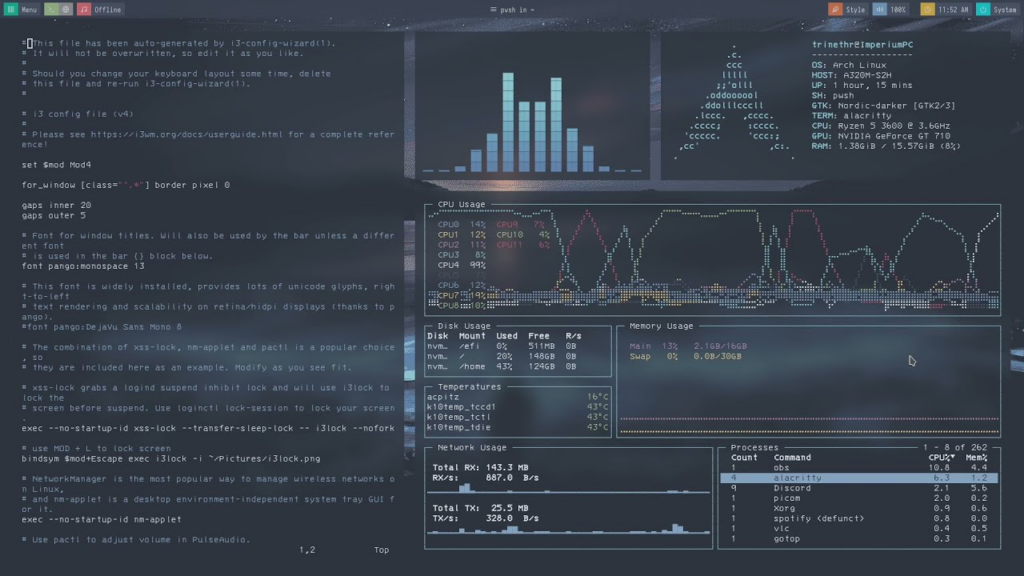
That is not my screen. I am not using Arch, BTW.
Leave a Reply